

A jargon buster for email is any habit or tool that flags corporate buzzwords in a draft and replaces them with plain English so colleagues can actually understand you. The Corporate Jargon Buster Chrome extension does that in the compose window: it underlines common phrases and suggests clearer alternatives before you hit send.
You can lose people in an inbox without meaning to. Technical terms, in-jokes, and slick buzzwords feel like they raise your professional profile. Often they only impress the intern who is still learning the dialect, and they freeze out anyone whose first language is not English or who has a learning disability.
This guide covers how the extension works, 11 of the most overused workplace phrases with replacements, and why your email is part of your personal brand. The same instinct belongs on a resume: strong action verbs beat empty buzzwords. If you want a mechanical check while you write, install the Corporate Jargon Buster in the Chrome Web Store.
Expert tip
Jargon spreads like a cold. Once a manager starts saying “circle back,” the whole floor copies it. Interrupt that loop in your own drafts first. Clear writing is a leadership signal, not a lack of sophistication.
Jargon is contagious: it moves through an office until everyone uses it. It then becomes a patch for gaps in knowledge and critical thinking. U.S. federal plain-language guidance is blunt: avoid jargon when a simpler word exists.
That is why so many people cringe at “blue sky thinking,” “level playing field,” and any amount of lipstick on a pig. A Chrome extension that highlights those phrases in an unsent email, then offers a plain-English swap, is a practical way to break the habit.
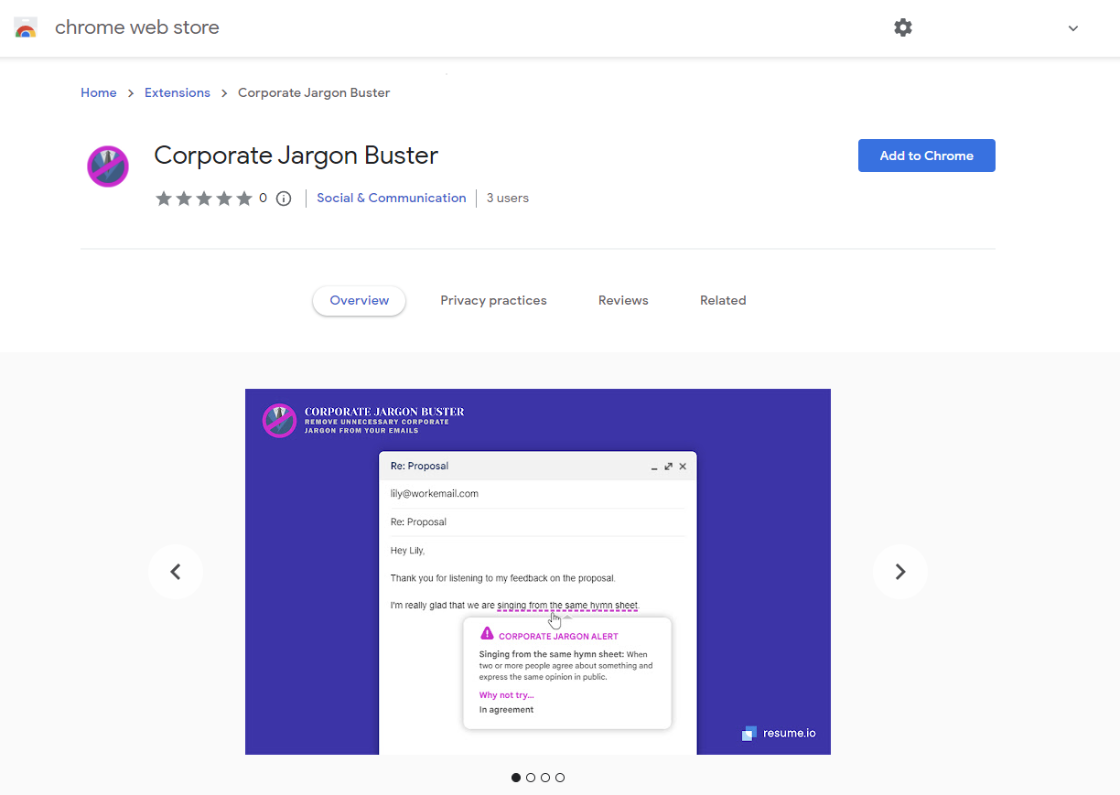
The tool landed as a New Zealand law requiring plain language in official communications made the cost of foggy phrasing more visible. Jargon is not only annoying. It raises accessibility barriers for readers with a learning disability or a different first language, and it is unkind to people who are new to the company and still learning the lingo.
How to Use Jargon Buster
Install the Corporate Jargon Buster from the Chrome Web Store, pin it, then refresh your webmail so it can underline jargon in the compose box. When you type one of the top 100 phrases the tool tracks, the words get a purple underline. Hover to see what the phrase means and a plainer option.
- Open the Corporate Jargon Buster listing in the Chrome Web Store.
- Click Add to Chrome to install it.
- Use the puzzle-piece icon at the top right of Chrome to see your extensions.
- Open Jargon Buster, confirm it is on, and adjust any options you want.
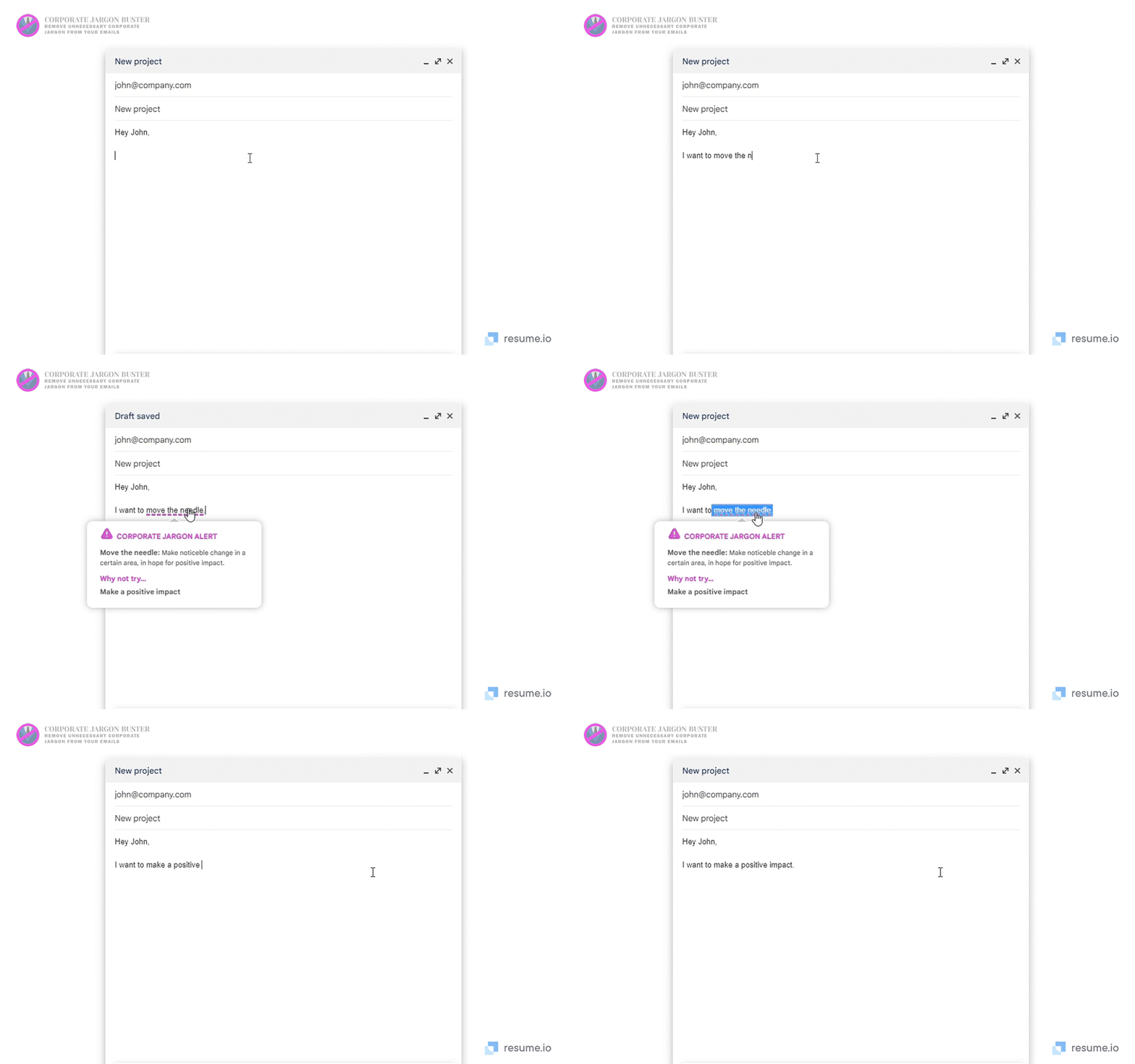
Try typing “lipstick on a pig” to confirm it is working. The goal is not to police personality. It is to catch the phrases that make you sound like a slide deck instead of a person.
The Common Workplace Jargon You Should “Kick Into Touch” (And What To Say Instead)
Kick the worst office cliches out of email and meetings by swapping them for shorter, literal phrases. Berkeley management professor Jennifer Chatman puts it plainly: people use jargon as a substitute for thinking hard about goals and the direction they want to give others.
Plutarch complained that sophists used words to veil their design. You have met managers like that. Well-meaning colleagues who default to buzzwords out of habit can still confuse a room. The infographic below lists 11 of the most common phrases. The table after it is the same list in a form you can scan without squinting at a graphic.
A 2021 study summarized on the graphic found that 86% of U.S. employees said they use workplace jargon, and 33% admitted they sometimes do not know what the words or phrases mean. That is a tax on teamwork, not a badge of fluency.

| Jargon | What it is trying to say | Say instead |
|---|---|---|
| Low-hanging fruit | An easy win or simple task | A quick and easy task |
| Have synergy | People or teams work better together than apart | Work well together |
| Push the envelope | Go beyond what is expected | Extend the limits |
| Make hay | Use a short window to get something done | Make the most of the opportunity |
| Circle back | Return to a topic later | Let's revisit this later |
| Boil the ocean | Take on an impossible or oversized task | Let's not waste time |
| Singing from the same hymn sheet | Share the same view or goal | Share the same understanding |
| Trim the fat | Remove extras from copy, budgets, or process | Cut it down |
| Blue sky thinking | Unconstrained creative ideas | Creative thinking |
| Bandwidth | Capacity, time, or energy | Time or resources |
| Move the needle | Create a change people can see | Make a noticeable change |
Use the same discipline in person. A meeting that could have been an email still fails if the email is stuffed with fog. If you are writing to apply, the same rule holds: a cover letter that sounds like a strategy offsite will not help you.
Before and after
Before: Let's circle back on the low-hanging fruit so we can move the needle this quarter if we have the bandwidth.

After: Can we revisit the easiest tasks next week so we can make a noticeable change this quarter? I do not have time for a larger scope until Friday.
Your Email is Your Calling Card… What Language Will You Use?
Write precise emails because professionals send and receive an average of 121 business emails a day. Dense jargon is sludge in that volume. Clear language is how you get a reply.
Every message is also a small sample of how you think. Independent, careful writers do not hide behind “synergy.” The same standard belongs on skills that get you hired: name the work, not the slogan. An ATS-friendly resume already punishes empty phrases. Your inbox should not be where they sneak back in.
Methodology and sources
To build the jargon list behind the Chrome extension, researchers first pulled 100 corporate jargon phrases and buzzwords from articles, listicles, and studies of common business language.
They then looked up each term in online sources and dictionaries and wrote an alternative that would be clearer and easier for people inside and outside corporate life to understand. The 11 phrases above are the ones called out in the accompanying infographic, with definitions drawn from those sources (including Merriam-Webster, Forbes, The Ladders, and plainlanguage.gov).
Frequently asked questions
Does the Corporate Jargon Buster work in every email app?
It is a Chrome extension, so it runs in Chrome on webmail you open in that browser. After you install it, refresh the mail tab. It is not a mobile keyboard or a desktop Outlook add-in.
What happens when I type a jargon phrase?
If the phrase is in the top 100 list, it is underlined in purple. Hover to see a meaning and a plain-language alternative. You still choose whether to change the sentence.
Is all workplace jargon bad?
Shared technical terms can be efficient inside a specialist team. The problem is cliches that hide meaning, shut out newcomers, or replace actual thought. If a new hire would need a glossary, rewrite it.
How do I write clearer emails without an extension?
Read the draft once as if you were new to the company. Replace metaphors with the actual request, deadline, or decision. Cut anything you would not say out loud to a colleague you respect.
Tools & guides mentioned in this article
- AI Resume Builder
Build an ATS-ready resume with AI writing help and live preview.
- Resume Templates
Browse ATS-friendly layouts for every industry and career stage.
- Free ATS Checker
Upload your resume and get an instant ATS compatibility score.
- Free Resume Checker
Grade your resume's overall quality, bullet impact, and clarity for free.
- Career Advice Blog
More resume, ATS, and job-search guides from MakeResume.
Land 3x more interviews with AI.
Don't let your resume get stuck in an ATS. Build an optimized resume in minutes, then validate it with our free checker.