
Cover letter format is not decorative — it is the framework that makes your argument readable in the ten seconds a hiring manager spends scanning it.
A professional cover letter layout with consistent spacing, predictable margins, and a clear six-section structure helps recruiters find what they need quickly. It also keeps your letter scannable for applicant tracking systems that parse documents before a human ever opens them.
This guide covers cover letter format step by step: layout, spacing, margins, fonts, role-specific adjustments, and the formatting mistakes that are easiest to fix before you hit submit.
How do I format a cover letter step by step?
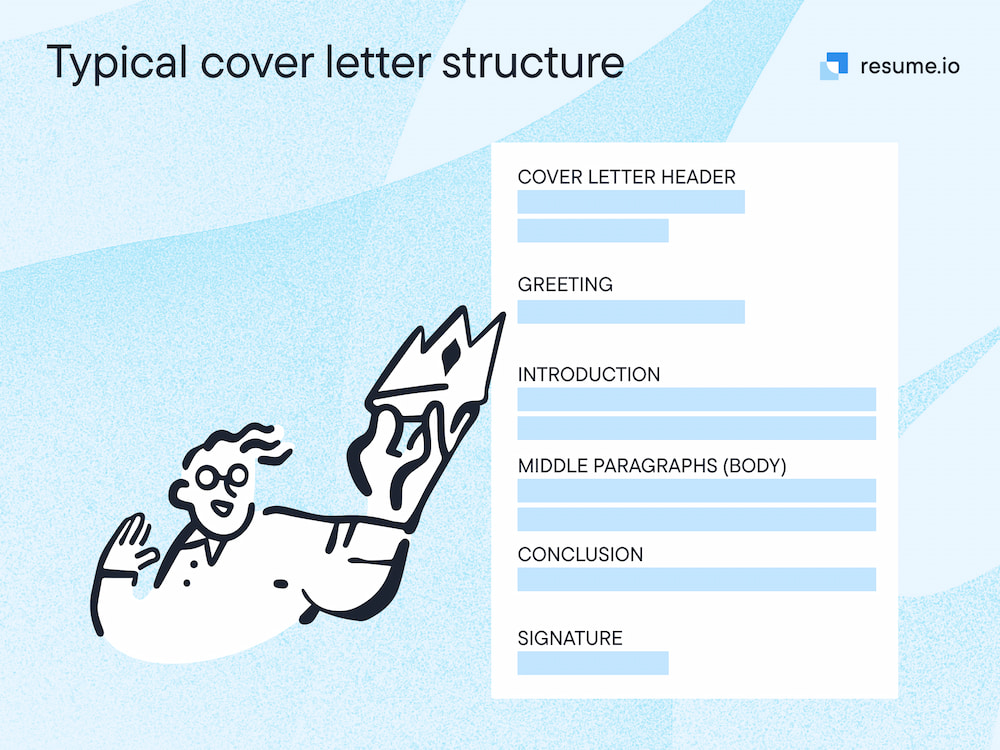
Format a cover letter in six sections, in this order: header, greeting, opening paragraph, body paragraphs, closing paragraph, and sign-off. Each section has a specific job, and keeping them in sequence is what makes the layout scannable at a glance.
Our cover letter generator applies this structure automatically — you add your content and the formatting stays consistent across every application.
1. Header
Place your name, phone number, email address, and LinkedIn profile at the top, followed by the date, the hiring manager's name, job title, company name, and company address.
Your cover letter header should match your resume in font, spacing, and layout so both documents read as a matched set. Mismatched headers are one of the first things recruiters notice — and one of the easiest details to get right.
2. Greeting
Address the hiring manager by name with “Dear [First Name Last Name],” — the standard cover letter salutation. If you cannot find a name after researching, “Dear Hiring Manager,” is the accepted fallback.
Avoid To Whom It May Concern, Dear Sir or Madam, and Dear Sir/Madam. All three read as dated and impersonal. See our full guide on how to address a cover letter for research strategies and alternative greetings.
3. Opening paragraph
Name the role you are applying for, where you found it, and what draws you to the opportunity — in two or three sentences. The opening earns the reader's attention; everything after it makes your case.
Avoid starting with “I am writing to apply for.” It tells the reader nothing they did not already know from the subject line or job posting. Lead with something specific to the role or company instead.
4. Body paragraphs
Use one or two paragraphs to connect your most relevant experience to what the employer needs. Pull one or two specific achievements from your resume and explain why they matter for this particular role.
Quantify where you can — numbers make achievements concrete and easier to remember. A tailored cover letter focuses on the accomplishments most relevant to the posting, not everything you have ever done.
5. Closing paragraph
Restate your interest, thank the hiring manager for their time, and include a clear call to action — such as expressing that you would welcome the opportunity to discuss your application further.
Keep the closing brief and confident. One or two sentences is enough; the body paragraphs already did the heavy lifting.
6. Sign-off
Close with “Sincerely,” or “Best regards,” followed by your full name. For a printed copy, leave space for a handwritten signature above your typed name.
See our cover letter examples for how a professional sign-off looks in context across different roles and industries.
What is the standard format for a cover letter?
A standard cover letter is one page, left-aligned, with 1-inch margins, single-spaced text, and a professional font between 10 and 12 points. Save the file as a PDF unless the employer requests otherwise.
The letter includes a header with contact details, a personalized greeting, three to four paragraphs of content, and a formal sign-off. That structure works across industries and roles — hiring managers expect it, and applicant tracking systems are built to read it.
Sticking to these conventions is not a limitation. It is what lets the content of your letter do the work instead of the layout distracting from it.
Here is a quick reference for the core formatting rules:
| Element | Standard |
|---|---|
| Page length | 1 page |
| Margins | 1 inch on all sides |
| Alignment | Left-aligned |
| Line spacing | Single-spaced |
| Paragraph spacing | One blank line between paragraphs |
| Font size | 10–12 pt |
| File format | PDF (unless asked for .docx) |
Not sure what belongs in each section? Our guide on what to include in a cover letter breaks down the content that fills this layout.
What are the spacing and margin rules for a cover letter?
Use 1-inch cover letter margins on all sides, single-spaced text throughout, and one blank line between each paragraph and between each section of the letter. Do not indent paragraph openings.
This balance of white space and text is what makes cover letter spacing comfortable to read at a glance. Margins smaller than 0.75 inches make the page look cramped and can interfere with ATS parsing.
If your letter runs onto a second page, cut content — do not shrink margins or reduce font size to compensate. A cover letter should stay on one page, and trimming words is almost always the right fix.
What font should I use in a cover letter?
Use a clean, professional font such as Calibri, Arial, Georgia, or Times New Roman at 11 or 12 points. Match the font on your resume so both documents feel like a single application.
Decorative or script fonts may look distinctive, but they reduce readability and can cause ATS parsing errors. When in doubt, choose the same typeface you used in your resume and move on — consistency matters more than novelty.
How long should a cover letter be?
A cover letter should be one page — three to four paragraphs and roughly 250 to 400 words. That is enough space to make a focused case without asking too much of the reader's time.
Length and format work together: if your letter exceeds one page, the issue is usually content, not layout. Tighten the body paragraphs before you adjust margins or font size.
How should I format a cover letter for different jobs?
The core cover letter format stays the same regardless of role: one page, clean layout, professional font, and the six-section structure above. What changes is the content you prioritize in the body — the achievements you lead with, the tone you use, and the specific value you demonstrate.
The table below shows what to emphasize for eight of the most common roles. Use it as a starting point, then tailor each letter to the specific posting.
| Job | What to include | What makes it specific |
|---|---|---|
| Marketing | Campaign results, channel expertise, and measurable outcomes such as growth in traffic, leads, or conversions | Hiring managers expect evidence of impact — vague claims about creativity carry less weight than numbers |
| Accounting | Accuracy, relevant qualifications (CPA, CMA), software proficiency, and examples of process improvements or cost savings | Trust and precision matter above all; the tone should be measured and the claims specific |
| Sales | Revenue figures, quota attainment, and examples of deals closed or accounts grown | Quantify everything — a sales cover letter that lacks numbers does not demonstrate the core skill of the role |
| Nursing | Clinical specialisms, patient care philosophy, and any relevant certifications or training beyond your core qualification | Empathy and competence both need to come through; leading with a patient-focused statement works well here |
| Teacher | Subject specialism, age group experience, and a specific example of a lesson, project, or outcome you are proud of | Schools want to see your teaching approach, not just your qualifications — give them a glimpse of how you work |
| Software engineer | Languages and frameworks, types of systems you have built, and a specific technical achievement or problem you solved | Avoid listing every tool you know; focus on the ones most relevant to the job description |
| Customer service | Communication skills, experience with specific tools or platforms, and a concrete example of resolving a difficult situation | The letter itself is a demonstration of how you communicate — clarity and warmth in the writing carry weight |
| Project manager | Methodologies (Agile, PMP, Prince2), scale of projects managed, and measurable outcomes such as on-time delivery or budget savings | Hiring managers want to see that you can manage complexity — vague statements about organization are not enough |
These are starting points, not rigid rules. The strongest cover letters pick one or two specifics from this list and build around them, rather than trying to cover everything at once.
How do I format a cover letter for email?
Simplify the cover letter layout for email: skip the formal header block, start directly with the greeting, and place your contact details beneath your sign-off.
Use your email client's default font and size, keep single spacing, and leave one blank line between paragraphs — the same rhythm as a document, without the top-of-page contact block.
- Subject line: Use “Job Title — Your Name” so the hiring manager can identify your application immediately. See our guide on how to address a cover letter for more subject line examples.
- Greeting: Start with “Dear [Name],” as you would in a printed letter
- Body: The same three to four paragraph structure applies
- Sign-off: Close with “Sincerely,” or “Best regards,” followed by your name and contact details
If the posting asks for a cover letter as an attachment, submit it as a PDF and write a short introductory message in the email body — two or three sentences explaining who you are and what you are applying for.
What are the most common cover letter formatting mistakes?
The most common cover letter formatting mistakes are shrinking margins to fit more content, choosing an unusual font, submitting a Word document when a PDF is expected, and inconsistent spacing between sections.
According to cover letter research, 83% of hiring managers say a well-written cover letter can help a candidate overcome a weaker resume — but poor formatting puts that advantage at risk before anyone reads a word.
Any of these errors can make a letter harder to read or cause it to fail an ATS scan before a person ever sees it. Here are the mistakes that come up most often, and what to do instead:
- Running to a second page: Tighten your content rather than adjusting margins or font size to compensate. See our guide on cover letter length for trimming strategies.
- Inconsistent spacing: Check that every paragraph break uses exactly one blank line, and that section gaps are uniform throughout.
- Using a decorative or non-standard font: Stick to the professional options listed above and match your resume.
- Submitting as a Word document by default: Unless the employer specifically asks for .docx, PDF preserves your cover letter layout on any device.
- Copying the resume: A cover letter should add context and personality, not restate what is already on the page. See what to include in a cover letter for the content that belongs here instead.
- Generic opening: Starting with “I am writing to apply for...” tells the reader nothing they did not already know. Open with something specific to the role or company instead.
Small formatting errors are easy to miss after staring at a document for a while. Before you submit, view the letter as a PDF on a different screen to catch any layout issues that did not show up in the editor.
Are there free templates for cover letter formatting?
Yes. MakeResume offers free cover letter templates that apply all of the formatting rules above automatically — margins, spacing, font, and structure are built in.
You choose a design, add your content, and the professional cover letter format is handled for you. Templates are especially useful when you are applying to multiple roles, since they let you update content without rebuilding the layout each time.
If you want to see finished examples before you start, the cover letter examples library shows how real letters look across a range of roles. Or use our cover letter generator to build a formatted letter from scratch in minutes.
For extra tips, watch our video on writing a cover letter for a job application below.
FAQs
These are the formatting questions job seekers ask most often.
Does cover letter formatting matter for ATS?
Yes. ATS software scans cover letters for relevant information, and non-standard fonts, tight margins, or unusual layouts can interfere with how the system reads your document.
Sticking to standard formatting ensures the content reaches a hiring manager in the form you intended. See our full guide on ATS-friendly cover letters for font, spacing, and file format recommendations.
Should I save my cover letter as a PDF or a Word document?
Save as a PDF unless the employer asks for a Word document. PDF files preserve your cover letter formatting across all devices and operating systems, so what you see in your editor is exactly what the hiring manager receives.
Do I need a header on my cover letter?
Yes. Your header should include your name, phone number, email address, and the date, followed by the employer's contact details.
It tells the hiring manager immediately who the letter is from and gives them a quick way to reach you. It also ensures your cover letter and resume look like a matched set. See our cover letter header guide for field-by-field formatting.
Tools & guides mentioned in this article
- AI Resume Builder
Build an ATS-ready resume with AI writing help and live preview.
- Resume Templates
Browse ATS-friendly layouts for every industry and career stage.
- Free ATS Checker
Upload your resume and get an instant ATS compatibility score.
- Career Advice Blog
More resume, ATS, and job-search guides from MakeResume.
Land 3x more interviews with AI.
Don't let your resume get stuck in an ATS. Build an optimized resume in minutes, then validate it with our free checker.